See what Prelum can produce
These four templates use the same POST /v1/render endpoint to produce an invoice, an asset label,
a multi-page report and this documentation manual. Select a preview to open its PDF, or use the
buttons below it to compare the PDF, PNG and SVG output.
Nothing is pre-installed in Prelum. Each render request carries its own Typst source, data and any additional files, which is why one endpoint can produce documents with very different layouts.
The source files are available in the repository's
examples/ directory. Expand the
sections under a preview when you want to inspect the Typst template or its example data.
Invoice
An A4 invoice: sender and customer blocks, a line-item table and computed totals. Quantities, prices and the VAT rate come from the request, and the template derives every sum.
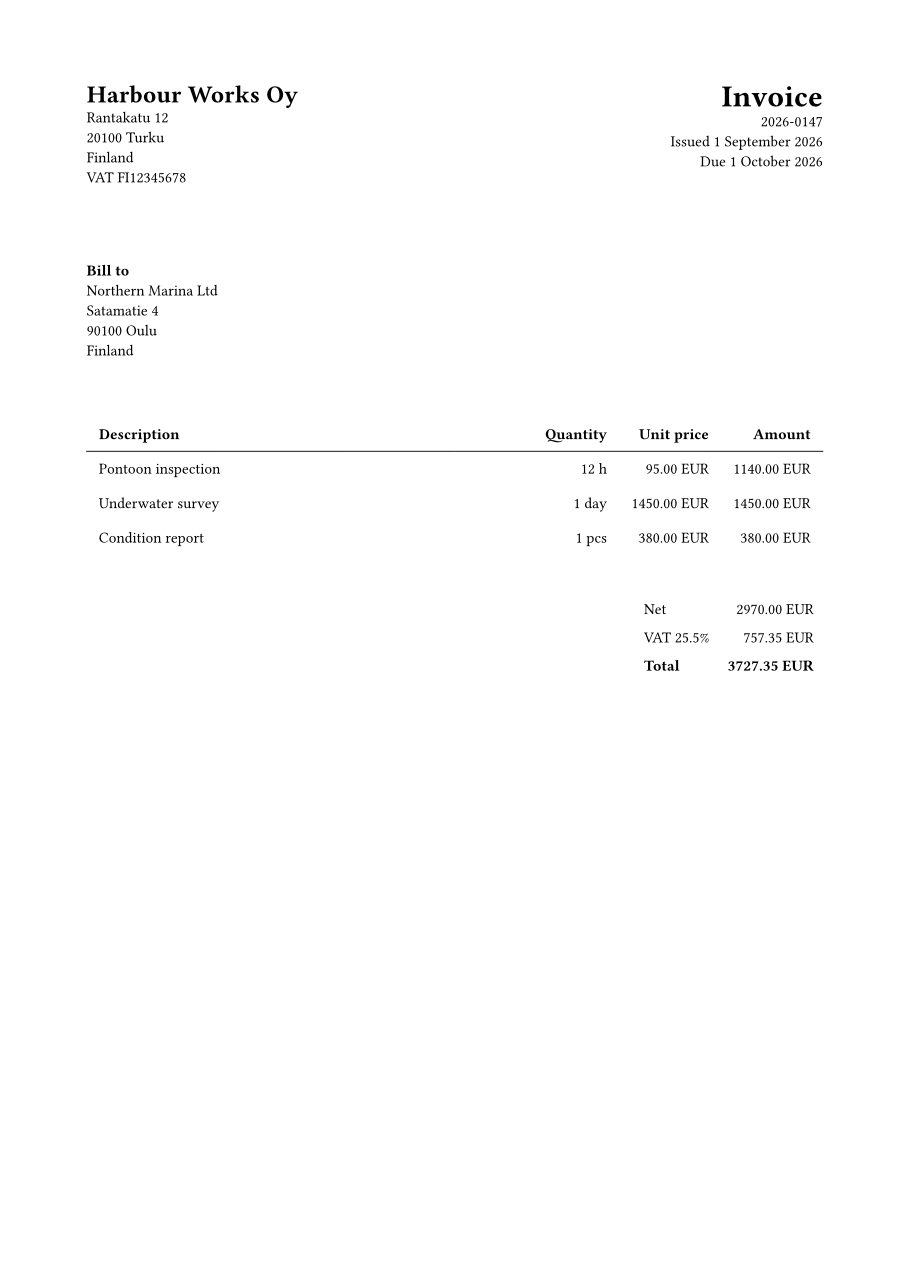
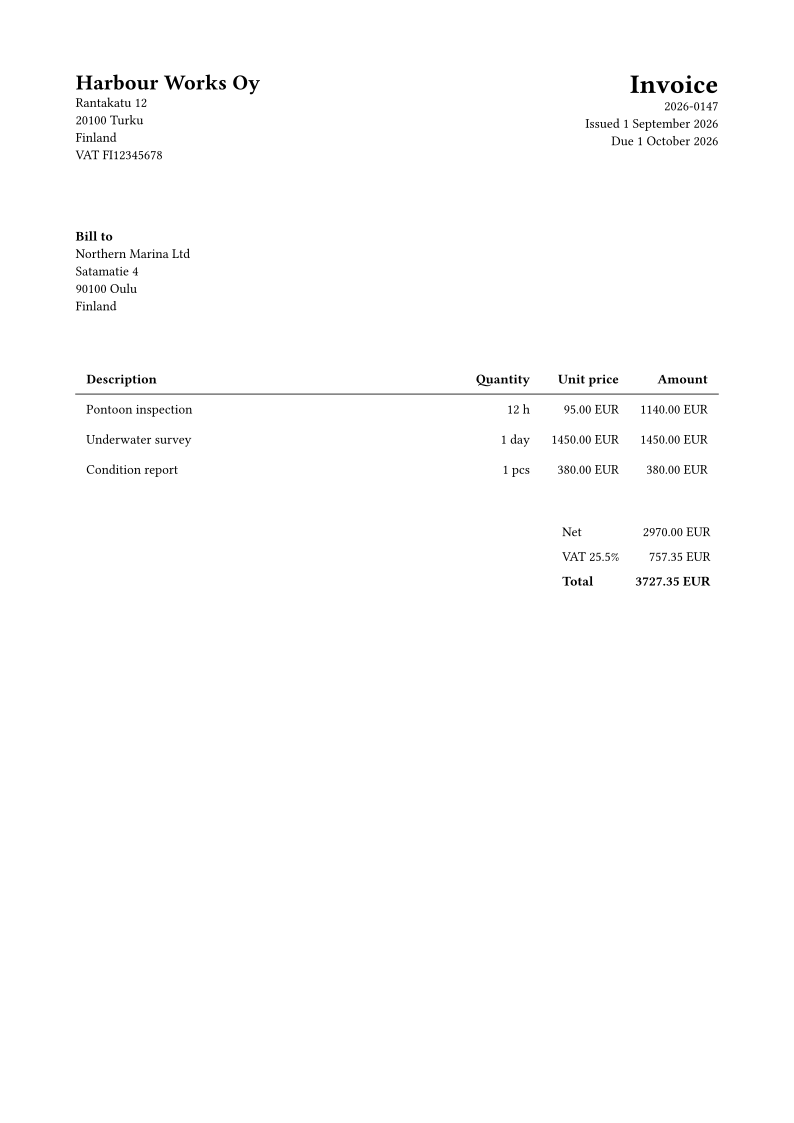
Template — examples/invoice/main.typ
// An A4 invoice. Everything variable comes from the request's `data` object, which the renderer
// binds to `data` in a prelude it prepends to this file; `data.json` beside this template is the
// example payload.

#let currency(amount) = {
  let cents = calc.round(amount * 100)
  let minor = calc.rem-euclid(cents, 100)
  [#calc.div-euclid(cents, 100).#if minor < 10 [0#minor] else [#minor] #data.currency]
}

#let net = data.lines.map(line => line.quantity * line.unit_price).sum()
#let vat = net * data.vat_rate
#let total = net + vat

#set page(paper: "a4", margin: 2cm, numbering: none)
#set text(size: 10pt, font: "Libertinus Serif")

#grid(
  columns: (1fr, 1fr),
  align: (left, right),
  [
    #text(size: 16pt, weight: "bold")[#data.seller.name] \
    #data.seller.address.join("\n") \
    VAT #data.seller.vat
  ],
  [
    #text(size: 20pt, weight: "bold")[Invoice] \
    #data.number \
    Issued #data.date \
    Due #data.due
  ],
)

#v(1.5cm)

*Bill to* \
#data.customer.name \
#data.customer.address.join("\n")

#v(1cm)

#table(
  columns: (1fr, auto, auto, auto),
  align: (left, right, right, right),
  stroke: (x, y) => if y == 0 { (bottom: 0.6pt) } else { none },
  inset: 8pt,
  table.header[*Description*][*Quantity*][*Unit price*][*Amount*],
  ..data.lines
    .map(line => (
      line.description,
      [#line.quantity #line.unit],
      currency(line.unit_price),
      currency(line.quantity * line.unit_price),
    ))
    .flatten(),
)

#v(0.5cm)

#align(right)[
  #table(
    columns: (auto, auto),
    align: (left, right),
    stroke: none,
    inset: 6pt,
    [Net], currency(net),
    [VAT #calc.round(data.vat_rate * 100, digits: 1)%], currency(vat),
    [*Total*], [*#currency(total)*],
  )
]
Data — examples/invoice/data.json
{
  "number": "2026-0147",
  "date": "1 September 2026",
  "due": "1 October 2026",
  "seller": {
    "name": "Harbour Works Oy",
    "address": ["Rantakatu 12", "20100 Turku", "Finland"],
    "vat": "FI12345678"
  },
  "customer": {
    "name": "Northern Marina Ltd",
    "address": ["Satamatie 4", "90100 Oulu", "Finland"]
  },
  "currency": "EUR",
  "vat_rate": 0.255,
  "lines": [
    { "description": "Pontoon inspection", "quantity": 12, "unit": "h", "unit_price": 95.0 },
    { "description": "Underwater survey", "quantity": 1, "unit": "day", "unit_price": 1450.0 },
    { "description": "Condition report", "quantity": 1, "unit": "pcs", "unit_price": 380.0 }
  ]
}
Label
An 80 × 50 mm asset label. Page size is a property of the template, not of the request: this and the invoice above reach the same endpoint with the same options.
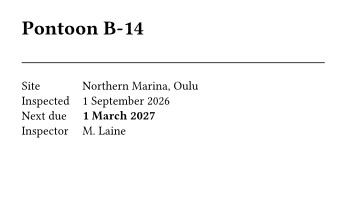
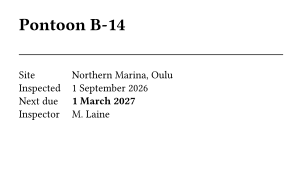
Template — examples/label/main.typ
// An 80x50 mm asset label. Page size belongs to the template, not to the request: the same
// endpoint returns this and the A4 invoice, and only the source decides which.

#set page(width: 80mm, height: 50mm, margin: 5mm)
#set text(size: 8pt)

#text(size: 13pt, weight: "bold")[#data.asset]

#v(1mm)
#line(length: 100%, stroke: 0.5pt)
#v(1mm)

#grid(
  columns: (auto, 1fr),
  row-gutter: 1.6mm,
  column-gutter: 3mm,
  [Site], [#data.site],
  [Inspected], [#data.inspected],
  [Next due], [*#data.next_due*],
  [Inspector], [#data.inspector],
)
Data — examples/label/data.json
Multi-page report
A three-page report, one page per section. Direct PNG and SVG output returns a single image, so the
previews below name page: 1; the archive returns every page in one ZIP.

PDF PNG, page 1 SVG, page 1 ZIP, all pages
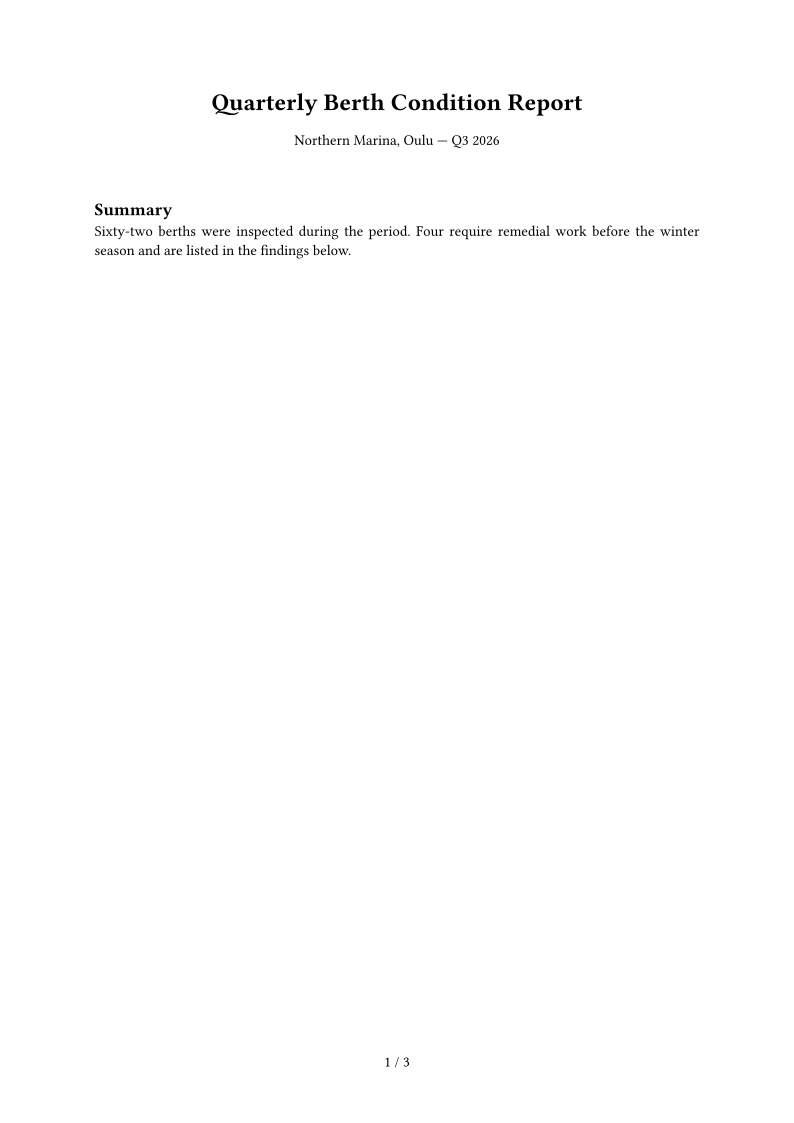
The archive contains page-01.png, page-02.png and page-03.png. Adding pages selects a
subset; see Output formats for the selector grammar.
Template — examples/report/main.typ
// A multi-page report. Each section starts a page, so the document exercises page selection and
// ZIP archive output as well as ordinary single-file PDF output.

#set page(paper: "a4", margin: 2.5cm, numbering: "1 / 1")
#set text(size: 11pt)
#set par(justify: true)

#align(center)[
  #text(size: 18pt, weight: "bold")[#data.title] \
  #v(2mm)
  #data.site — #data.period
]

#for (index, section) in data.sections.enumerate() [
  #if index > 0 [#pagebreak()] else [#v(1cm)]
  == #section.heading
  #section.body
]
Data — examples/report/data.json
{
  "title": "Quarterly Berth Condition Report",
  "site": "Northern Marina, Oulu",
  "period": "Q3 2026",
  "sections": [
    {
      "heading": "Summary",
      "body": "Sixty-two berths were inspected during the period. Four require remedial work before the winter season and are listed in the findings below."
    },
    {
      "heading": "Findings",
      "body": "Berths B-14 and B-15 show fastener corrosion at the shoreward hinge. Berth C-02 has a damaged fender. Berth C-09 requires a replacement cleat."
    },
    {
      "heading": "Recommendations",
      "body": "Schedule the four remedial items before the first freeze. Re-inspect the B row after the works and update the asset labels accordingly."
    }
  ]
}
This documentation as a PDF
The manual below is this site. Every page in the navigation is converted to the block structure the template typesets, so the PDF cannot describe a version of Prelum the site does not, and it is rendered by the same build that publishes these pages.
It is also the example that carries an attachment: the logo travels in files under the key the
template imports it by, exactly as a caller would send a font, a signature image or a letterhead.

PDF, complete manual PNG, cover SVG, cover

The template holds no documentation text of its own. It is a cover, a running header and footer, a table of contents, and one rule per block kind — which makes it the shortest complete illustration of multi-page layout in this set.
{
  "source": "<the template below>",
  "files": {
    "assets/prelum-logo-concept.svg": { "encoding": "text", "content": "<svg ...>" }
  },
  "data": {
    "title": "Prelum",
    "logo": "assets/prelum-logo-concept.svg",
    "chapters": []
  },
  "output": { "format": "pdf", "filename": "manual.pdf" }
}
Template — examples/manual/main.typ
// A printable manual, typeset from the published documentation. The request carries the whole
// document in `data` and the logo as a `files` entry, so this template holds only presentation:
// a cover, a running header and footer, a table of contents, and one rule per content block.
//
// `data` is generated by scripts/manual_content.py from docs/ and zensical.toml, which is why the
// manual cannot drift from the site it is made of.

#let accent = rgb("#3f51b5")
#let shade = rgb("#f4f4f8")

// One inline span. These four kinds are all the converter emits.
#let span-content(span) = {
  if span.kind == "code" {
    raw(span.text)
  } else if span.kind == "strong" {
    strong(span.text)
  } else if span.kind == "link" {
    link(span.href, text(fill: accent, span.text))
  } else if span.kind == "ref" {
    // A link to another chapter of this manual rather than to the site it was made from.
    link(label(span.target), text(fill: accent, span.text))
  } else {
    span.text
  }
}

#let spans(items) = items.map(span-content).join()

#let cells(row) = row.map(cell => spans(cell))

// One content block. Headings keep the level they had on the page, so the page's own `#` becomes
// the chapter title the outline and the running header pick up.
#let content-block(item) = {
  if item.type == "heading" {
    heading(level: item.level, item.text)
  } else if item.type == "paragraph" {
    par(spans(item.spans))
  } else if item.type == "code" {
    block(
      width: 100%,
      fill: shade,
      inset: 6pt,
      radius: 3pt,
      breakable: true,
      text(size: 7.5pt, raw(item.text, lang: if item.language != "" { item.language })),
    )
  } else if item.type == "list" {
    list(..item.items.map(entry => spans(entry)))
  } else if item.type == "table" {
    block(
      breakable: true,
      text(size: 9pt, table(
        columns: item.header.len(),
        stroke: (x, y) => if y == 0 { (bottom: 0.6pt + accent) } else { (bottom: 0.2pt + luma(200)) },
        inset: 4.5pt,
        table.header(..cells(item.header).map(cell => strong(cell))),
        ..item.rows.map(row => cells(row)).flatten(),
      )),
    )
  }
}

// Two faces travel with the request, and only their Medium and Bold cuts, so every rule that
// selects one names one of those weights; asking for a weight that is absent would silently fall
// back to the body face.
#let display = "Space Grotesk" // headings
#let wordmark = "Inter Display" // the name and its tagline on the cover

#set text(size: 10pt)
#set par(justify: true, leading: 0.65em, spacing: 0.8em)
#show heading: set text(font: display)
#show heading.where(level: 1): set text(size: 17pt, weight: "bold", fill: accent)
#show heading.where(level: 2): set text(size: 12pt, weight: "medium")
#show heading.where(level: 3): set text(size: 10.5pt, weight: "medium")
#show heading: set block(above: 1.3em, below: 0.9em)
#show raw.where(block: false): set text(size: 9pt)

// Cover. Its own page rule keeps the header and footer off the first sheet.
#page(margin: 2.5cm, header: none, footer: none)[
  #v(3.5cm)
  // The mark ends 32 units above the bottom of its 256-unit viewBox, so bottom-aligning the boxes
  // would leave the name sitting below the mark it is set against. Lifting the text column by that
  // same proportion puts the two on one baseline whatever the logo is scaled to.
  #let logo-width = 62mm
  #let logo-clearance = logo-width * 32 / 256
  #grid(
    columns: (auto, 1fr),
    column-gutter: 12mm,
    align: (left + bottom, left + bottom),
    image(data.logo, width: logo-width),
    {
      // Measured by the glyph outlines rather than by the baseline: the tagline ends in descenders,
      // and aligning a baseline with the mark's hard edge leaves those hanging below it, which is
      // what the eye reads as "slightly too low".
      set text(font: wordmark, top-edge: "bounds", bottom-edge: "bounds")
      // Paragraph spacing would stack on top of the explicit gap below, so the lockup states its
      // own: the distance between the name and its tagline is a design decision, not a leftover.
      set par(spacing: 0pt)
      text(size: 40pt, weight: "bold", tracking: -1pt)[#data.title]
      v(3.5mm)
      text(size: 14pt, weight: "medium", fill: luma(95))[#data.subtitle]
      v(logo-clearance)
    },
  )
  #v(14mm)
  #block(width: 85%, text(size: 11pt)[#data.description])
  #v(1fr)
  #text(size: 9pt, fill: luma(110))[
    #link(data.site_url, data.site_url) \
    #link(data.repo_url, data.repo_url)
  ]
]

#set page(
  paper: "a4",
  margin: (top: 2.2cm, bottom: 2cm, x: 2cm),
  header: context {
    // The running header names the chapter the reader is in. Selection is by page number rather
    // than by `before(here())`: a header is laid out at the top of its page, so "before here"
    // would find the previous chapter on every page a chapter starts on.
    let current = here().page()
    let seen = query(heading.where(level: 1)).filter(item => item.location().page() <= current)
    if seen.len() > 0 {
      set text(size: 8pt, fill: luma(110))
      grid(
        columns: (1fr, auto),
        align: (left, right),
        emph(seen.last().body), data.title,
      )
      v(-6pt)
      line(length: 100%, stroke: 0.4pt + luma(200))
    }
  },
  footer: context {
    set text(size: 8pt, fill: luma(110))
    align(center, counter(page).display("1 / 1", both: true))
  },
)
#counter(page).update(1)

// The contents title is deliberately not a heading: chapters own level 1, and the running header
// above finds the current chapter by asking for exactly those.
#text(font: display, size: 17pt, weight: "bold", fill: accent)[Contents]
#v(6mm)
#outline(title: none, depth: 1)

#for chapter in data.chapters {
  pagebreak()
  // An empty anchor carrying the chapter's label, so a cross-reference in the text can jump here.
  [#metadata(chapter.id)#label(chapter.id)]
  if chapter.section != none {
    text(size: 8pt, fill: luma(130), tracking: 1pt, upper(chapter.section))
    v(-2mm)
  }
  chapter.blocks.map(content-block).join()
}
Render an example yourself
With Prelum running locally, execute this from the repository root to render the invoice. The jq
command reads the template and data files and assembles the JSON request:
curl --silent --show-error --fail-with-body \
  http://localhost:9870/v1/render \
  -H "Content-Type: application/json" \
  -H "X-Prelum-Api-Token: dev-only-insecure-token" \
  -d "$(jq -n \
        --rawfile source examples/invoice/main.typ \
        --slurpfile data examples/invoice/data.json \
        '{source: $source, data: $data[0], output: {format: "pdf"}}')" \
  --output invoice.pdf
See Render request for auxiliary files, and
Output formats for the full set of output options.
The rendered files shown on this page are regenerated from the checked-in sources with
make docs-examples.